

Marketo Overview
What is Marketo Engage?
Marketo Engage helps marketing teams be the drivers of demand and growth in their companies by delivering exceptional experiences in concert with sales at every stage of the customer journey.
The challenge these teams face is that everyone today expects a personalized experience whenever they interact with a company - they don’t have patience for generic marketing and the last thing they want is a cold call from sales. So to stay competitive, marketing teams are scrambling to understand customers better, so they can give them a better experience, because this is disrupting entire industries. And a big part of what’s needed is figuring out how marketing and sales can do a better job together.
Marketo Engage is redefining a category of software called Marketing Automation by helping these companies bring together the customer data, content, automation and analytics needed for marketing and sales to coordinate engagement with customers that’s personalized and measurable at every touchpoint - and do it with efficiency and scale.
Who Uses Marketo?
Marketing practitioners who need to get campaigns built and nurturing strategies operationalized.
Sales reps who now have insight into all the digital behavior of prospects and can now have better, more contextual engagement.
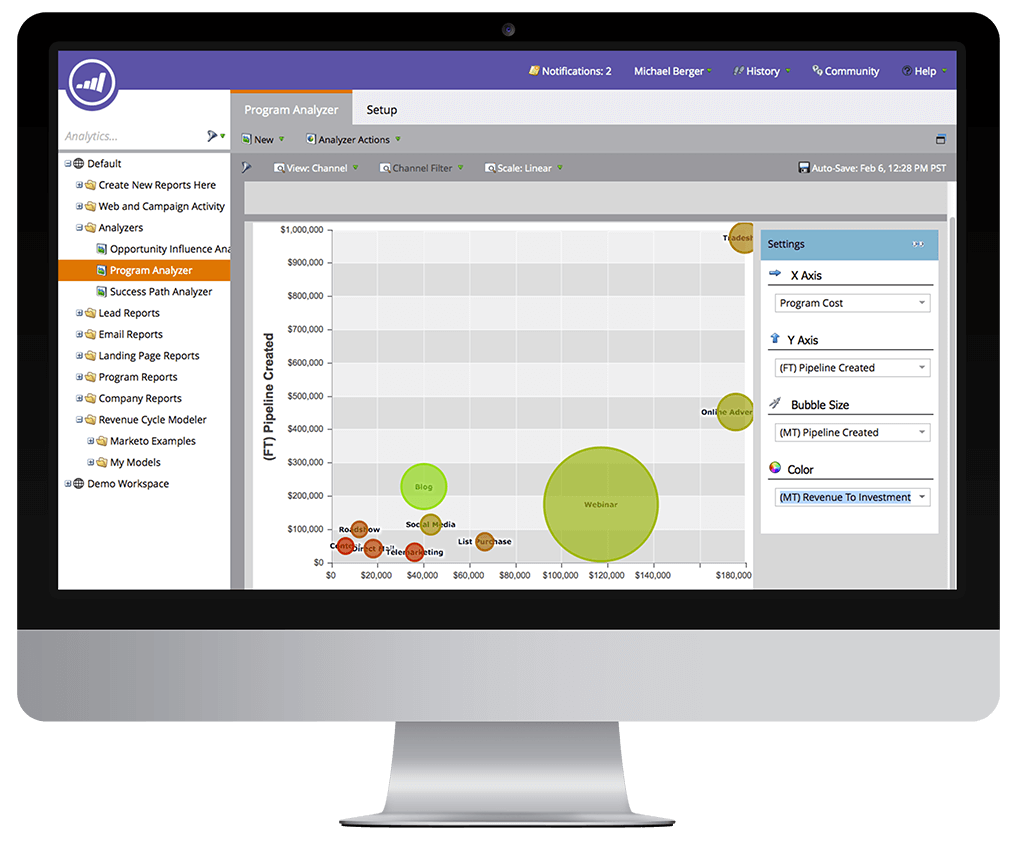
Marketing execs who can now correlate marketing investment to sales pipeline and revenue.
Marketo users may be in demand generation, marketing operations, sales, executives, sales and marketing agencies, product management, product marketing, brand managers and marketing administrators.
Get to know Marketo Engage
Lead Nurturing & Management
Nurture potential customers from inquiry to close by managing leads and strategic accounts with automated journey flows and CRM integrations.
Account-Based Marketing
Go beyond marketing to create account-based experiences (ABX) by partnering with sales to engage key, high-potential accounts and measure your success.

Personalization
Use machine learning and predictive analytics to automatically put the most relevant content in front of each buyer across channels.
Cross-Channel Engagement
Engage with your leads and accounts by delivering personalized messages and content across every channel, including email, mobile, and more.
Integrated Sales Applications
Better align marketing and sales to engage the high-priority accounts by tapping into better visibility, insights, templates, and sales playbooks.
Marketing Measurement and Attribution
Understand, prove, and optimize your marketing impact with comprehensive campaign performance and attributed revenue analytics.


Adobe

English

1982

San Jose, CA


Marketo Support
Adobe
English
1982
San Jose, CA
Top 10 Marketo Alternatives & competitors
Going to implement marketing automation and considering Marketo? We recommend to look at similar software to find a solution.
When customers choose marketing automation tool, in most cases they are looking for functionality for email builder, CRM, landing page builder, lead scoring, A etc.
Comparing Marketo with competitors users pay attention to the HTML email builder, marketing lead database, chatbots, conversations, survey builder, segmentation, number of triggers and actions and so on.
We’ve compiled a list of top 10 competitors that are very resembling in price and features to Marketo. The list is based on popularity, so if Marketo doesn’t suit you in any way, here you can easily select the best variant for you.

E2 Shop System
Try for FreeWe help shops and manufacturers of all kinds and sizes work smarter for improved efficiencies, greater flexibility and bigger profits.

SharpSpring
Try for FreeSharpSpring is one of the most flexible platforms on the market, offering behavior-based email marketing, native or 3rd party CRM integration, dynamic forms, landing page and blog builders, universal CMS compatibility, and integration with hundreds of applications.

Calamari
Try for FreeCalamari is an online Human Resources (HR) software service, designed for the profiles of all the companies. Our team created the application in the way that is the easiest to understand and employ for the end user. It is not overloaded with unnecessary functions. It has specific and crucial features, needed by companies to provide an efficient management system. With Calamari, customers only pay for what they need. Prices are made based on the size of the company with a flexible and fully adaptable range of services.
SharpSpring
Try for FreeSharpSpring is one of the most flexible platforms on the market, offering behavior-based email marketing, native or 3rd party CRM integration, dynamic forms, landing page and blog builders, universal CMS compatibility, and integration with hundreds of applications.

Profit
Try for FreeProfit.co is the best platform to rollout OKRs for your entire organization. Extremely easy to onboard and use, Profit comes with over 300 metrics and allows you to define your own custom metrics with ease. You can ensure complete alignment within your organization using Aligned OKRs that let you trickle down company level OKRs to every individual contributor.

ActiveCampaign
Try for FreeActiveCampaign is a platform that helps businesses automate customer experiences and build meaningful connections with their customers. Since 2003, ActiveCampaign has created tools that are both powerful and easy to use – because growing businesses don't always have the time to set up new tech. Today, 80,000+ businesses use ActiveCampaign for their email marketing, marketing automation, or CRM.

Instagram Lead Ads
Try for FreeLead form ads are an ad type served from an ad account on Facebook's Ads Manager which allow advertisers to collect information from potential customers without those customers having to leave the native environment of Instagram.

Abowire
Try for FreeAutopilot for your subscription business

Float
Try for FreeFloat is resource management software trusted by 3,000+ of the worlds top teams. Since 2012, Float has been helping brands including BuzzFeed, Ogilvy, M&C Saatchi and Deloitte plan their projects and schedule their teams time. At a glance, see who¿s working on what, when and from where. Float makes remote resource planning visual and simple. Integrate with Slack, Google Calendar, Outlook, Teamwork and Zapier.
ActiveCampaign
Try for FreeActiveCampaign is a platform that helps businesses automate customer experiences and build meaningful connections with their customers. Since 2003, ActiveCampaign has created tools that are both powerful and easy to use – because growing businesses don't always have the time to set up new tech. Today, 80,000+ businesses use ActiveCampaign for their email marketing, marketing automation, or CRM.

Breezy
Try for FreeBreezy HR is end-to-end recruiting software designed to optimize your recruiting process and delight your entire team. Bring everyone on board in less time (and with less hassle) with our user-friendly, feature-rich platform.
How to choose Marketo substitute
Many marketing automation tools are similar to each other. Software with identical functionality can differ in cost by 3 times. The first thing you should look at is the availability of funnel builder. This is a basic feature of marketing automation platforms and if it doesn’t include this thing, most likely this tool isn’t formed yet. All funnel builders look almost the same. It's important not to pay attention to the UI, but look at the functionality.
In a few days, you'll get used to the design, but the missing functionality will always spite you. Changing marketing automation tools is very expensive. If you have the usual email set up, it's not that difficult to switch to another tool. But if you've already configured integrations, business processes, and have complex funnels, it can take months to replace the tool. That's why you should be attentive to choosing an alternative.
What to look for when analyzing the flow builder? It has 4 important features categories.
- Triggers. For instance, "Form submit" is a trigger that starts a funnel. The most often used triggers are: opening an email, clicking a link in an email, reaching a goal, adding or removing a tag, closing a deal, visiting a page, etc. In each tool for marketing automation this set is different. The more, the better.
- Action. For example, "Send email". This is the most basic action you can have. The most often used actions are: add or remove a tag, send a text message, send a messenger message, set a salesperson task, update a transaction, notify someone by email, move a transaction to another stage, etc.
- Delay. For instance, "Wait 5 days. Client fill in the form on the website and get in the marketing automation software (Trigger), the tool sends a Welcome email (Action). After that the software waits 4 hours (delay) and sends a second email. This is the most standard automation. But there are other variants. For example, "Wait until something happens". Or wait until January 10th, or wait until 9 PM in the lead’s time zone.
- If/else. For example, "If a customer, has the tag "Bought product #1", send the email, if the contact doesn't have the tag "Bought product #1", wait 4 weeks and send the email. The most often used if/else parameters are: was on the site page, purchased certain items, opened certain emails, user field the contact card matches some criteria. This is data according to which you can segment the lead base.
Studying the automation builder, you should pay attention to all four categories of functions. The more, the better. Often it happens that good-working marketing automation platforms with the biggest number of features look ugly. New platforms look nice, but they have few features. You need to the system you going to use very deeply. Otherwise, it will be very hard to change it in the future.
After you've analyzed the automation builder, you should find out whether there are integrations with the platforms you need. Luckily, Apiway can help you. Usually, platforms like Marketo are the core of business IT infrastructure. It's kind of digital hub for all your client. This type of tool is like an tree, which is putting its roots into other tool. Software like Marketo has to integrate with most other ones. Or you’ll have to spend a lot of money and time creating custom integrations.
Also users who are trying to find alternatives to Marketo use software from other categories like chatbot software, chat on website software, CRM system, lead management software
All Marketo alternativesMarketo integrations
Apiway allows you to integrate Marketo with thousands of the most popular tools. You can automate your workflow and have more time for main things—no code required.
Marketo